源代码:点击此处下载
wordcloud库的简单示范
1
2
3
4
5
6
7
8
9
10
11
12
13
14
15
16
17
18
19
20
from wordcloud import WordCloudfrom wordcloud import ImageColorGeneratorfrom PIL import Imageimport numpy as nptxt = "Python Java C++ JavaScript PHP Ruby Swift Kotlin Go Rust" c = WordCloud( width=400 , height=400 , font_path=None , repeat=True , mask=np.array(Image.open ("love.png" )), background_color="white" , max_words=150 ) c.generate(txt) c.to_file("词云图.jpg" )
使用wordcloud库报错记录
在使用wordcloud库的时候,运行报错:ValueError: Only supported for TrueType fonts
解决方案:去升级pillow库!!!
anaconda安装第三方jieba库
打开Anaconda Prompt,并进入目标环境。输入 activate 环境名
输入 pip install jieba
如果因为网络原因而下载失败,可使用清华大学镜像(99.9%解决下载失败问题):https://pypi.tuna.tsinghua.edu.cn/simple
jieba库的简单示范
1
2
3
4
5
6
7
8
9
10
11
12
13
14
import jiebas = "中国是一个伟大的国家" s1 = jieba.lcut(s) print (s1)s2 = jieba.lcut(s, cut_all=True ) print (s2)s3 = jieba.lcut_for_search(s) print (s3)
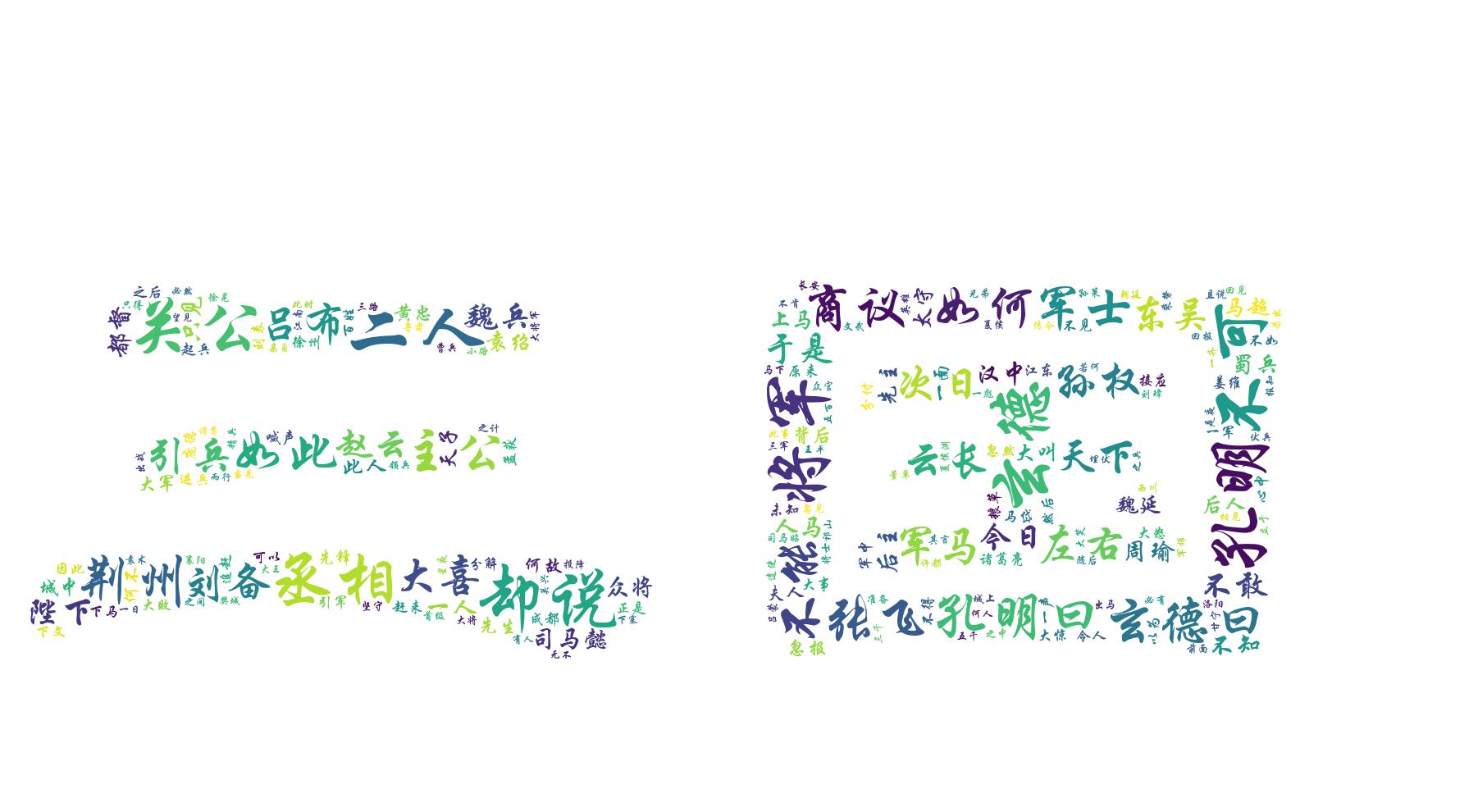
任务 1:三国演义中的常见词汇分布在“三国"这两个隶书字上,出现频率高的词字体大
1
2
3
4
5
6
7
8
9
10
11
12
13
14
15
16
17
18
19
20
21
22
23
24
25
26
27
28
29
30
31
32
33
34
35
36
37
38
39
40
41
42
43
44
45
46
47
48
49
50
from wordcloud import WordCloudfrom wordcloud import ImageColorGeneratorfrom PIL import Imageimport numpy as npfrom jieba import *def getText (filename ): text = open ("{}" .format (filename), encoding='utf-8' ).read() sign = '''!~·@¥……*“”‘’\n(){}【】;:"'「,」。-、?\u3000\ufeff''' for ch in sign: text = text.replace(ch, ' ' ) return text def wordCount (text, N ): words = lcut(text) counts = {} for word in words: if len (word) < 2 : continue if word not in counts: counts[word] = 0 else : counts[word] += 1 temp = sorted (counts.items(), key=lambda d: d[1 ], reverse=True ) result = dict (temp[1 :N+1 ]) return result def drawWordCloud (data, N ): c = WordCloud( width=400 , height=400 , font_path="C:\Windows\Fonts\STXINGKA.TTF" , repeat=False , mask=np.array(Image.open ("三国.png" )), background_color="white" , max_words=N ) result_str = ' ' .join(data.keys()) c.generate(result_str) c.to_file("自制结果1.jpg" ) if __name__ == '__main__' : N = 200 text = getText('三国演义utf8.txt' ) result = wordCount(text, N) drawWordCloud(result, N)
运行结果:
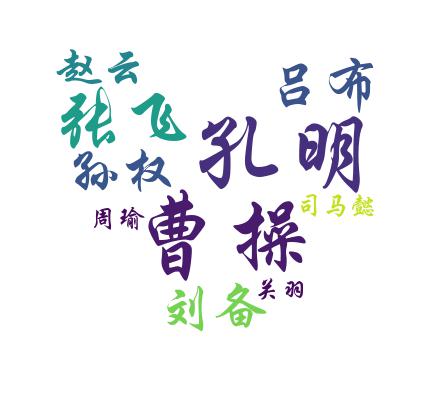
任务 2:三国演义中出现频率前十的人名。必须是以下这十个名字,名字组成心形
十个名字:刘备、赵云、关羽、周瑜、曹操、孔明、孙权、司马懿、张飞、吕布
1
2
3
4
5
6
7
8
9
10
11
12
13
14
15
16
17
18
19
20
21
22
23
24
25
26
27
28
29
30
31
32
33
34
35
36
37
38
39
40
41
42
43
44
45
46
47
48
49
50
51
52
from wordcloud import WordCloudfrom wordcloud import ImageColorGeneratorfrom PIL import Imageimport numpy as npfrom jieba import *def getText (filename ): text = open ("{}" .format (filename), encoding='utf-8' ).read() sign = '''!~·@¥……*“”‘’\n(){}【】;:"'「,」。-、?\u3000\ufeff''' for ch in sign: text = text.replace(ch, ' ' ) return text def wordCount (text, N ): words = lcut(text) counts = {} name = ["刘备" , "赵云" , "关羽" , "周瑜" , "曹操" , "孔明" , "孙权" , "司马懿" , "张飞" , "吕布" ] for word in words: if word in name: if word not in counts: counts[word] = 0 else : counts[word] += 1 else : continue temp = sorted (counts.items(), key=lambda d: d[1 ], reverse=True ) result = dict (temp[:N]) return result def drawWordCloud (data, N ): c = WordCloud( width=400 , height=400 , font_path="C:\Windows\Fonts\STXINGKA.TTF" , repeat=False , mask=np.array(Image.open ("love.png" )), background_color="white" , max_words=N ) result_str = ' ' .join(data.keys()) c.generate(result_str) c.to_file("自制结果2.jpg" ) if __name__ == '__main__' : text = getText('三国演义utf8.txt' ) result = wordCount(text, 10 ) drawWordCloud(result, 10 )
运行结果: